Deftform Changelog

Subscribe to updates
© 2026 Deftform Changelog

Feature

Nov 13, 2026

You can now connect AI assistants like Claude Code, Claude Desktop, Cursor or VS Code to your Deftform workspace with the new MCP server (Model Context Protocol). Ask your assistant in plain language to create forms, add and arrange fields, change settings or look at your responses, and it does the work in your workspace. ChatGPT and the claude.ai website aren't supported yet, as they require signing in via OAuth instead of using an API token.

What your assistant can do

  • Build forms from scratch. Create a form and add up to 50 fields in one go, including short and long text, email, phone, number, date, dropdowns, single and multiple choice, ranking, rating, slider, time picker, address, file upload, eSignature, opt-in checkbox, hidden fields, paragraphs, dividers, spacers and page breaks.
  • Edit existing forms. Update labels, options, placeholders, help texts, required status and other field settings. It can also delete fields, reorder them, or insert new fields at a specific position.
  • Manage form settings. Close or reopen forms, change the submit button label, completion message, notification emails, SEO settings and more.
  • Work with responses. List and filter responses, open single responses, download response PDFs, and get statistics such as response counts, conversion rates, trends and answer distributions.
  • Submit responses to your forms, for example to import data or test a form.

Built with safety in mind

  • Content written by your assistant is cleaned before it's saved. Labels and options are stored as plain text, and paragraph and consent texts only allow basic formatting and safe links.
  • HTML/code, image and embed elements can only be added in the form builder.
  • Deleting a field is marked as a destructive action, so your MCP client can ask you for confirmation first.
  • Your assistant only ever sees the workspace that the token belongs to.

Getting started

Go to Settings → API + MCP, create a token and add the server to your MCP client:

{
"mcpServers": {
"deftform": {
"type": "http",
"url": "https://deftform.com/mcp",
"headers": {
"Authorization": "Bearer YOUR_TOKEN"
}
}
}
}

Read our help center article to learn more.

Read-only and read & write tokens

When you create an API token, you now choose its access level:

  • Read-only access: view forms, fields and responses. This is the new default and a good fit for reporting or for trying out AI assistants.
  • Read & write access: also create and change forms, fields and settings, and submit responses.

The token list shows the access level of each token. Your existing tokens keep full access, so current integrations keep working. With a read-only token, MCP tools that change data aren't offered to your assistant, and API requests that change data return 403 Forbidden.

API: manage form fields

Everything the MCP server can do with fields is now also available in the REST API:

  • POST /forms/{id}/fields adds one or more fields, optionally at a specific position.
  • PATCH /forms/{id}/fields/{UUID} updates a field's settings.
  • DELETE /forms/{id}/fields/{UUID} deletes a field.
  • POST /forms/{id}/fields/order sets the order of all fields.

Form data returned by the API now also includes more field settings, such as the custom key, read-only state, slider, time picker and phone settings, opt-in value and hidden field default. These endpoints need a token with read & write access.

Improvements

  • Tightened access checks in the form builder for adding, editing and duplicating fields and for validation rules.
Apr 21, 2026

Today, we released a feature that many of our customers were eagerly awaiting: the ability to track incomplete submissions.

Within the form settings, administrators can now find an option to "Track incomplete submissions". This feature is disabled by default to prevent clutter, but it can be enabled on a per-form basis. Incomplete submissions are displayed as a yellow line in the "Responses" view.

Minor UI and UX improvements

We also optimized a few smaller things across the backend area. For example, the button to add a new element to a form is more prominent. It's also a bit more clearer (hopefully) what to click to contact support.

Additionally, if you are selling products via Stripe, we now fetch product images and display them on the form. To synchronize these images, simply save your form settings once with "Enable form checkout" active.

Feb 12, 2026

Deftform is nearing its 2-year anniversary, and we felt that a refreshed interface for the backend would be a proper way to celebrate. Last year, we launched a platform called tinydub and were uncertain if people would miss the standard sidebar/content combo. We shipped a very slim interface that was easy to grasp, and it turns out people like it.

So we decided to take the same step of removing the sidebar for Deftform. At first, it felt a little worse to navigate, but as with all new things, it sometimes just takes some time to get used to before realizing it's the better choice. That's what we felt with the current redesign. It's cleaner, easier to grasp, and avoids unnecessary design choices.

We hope you like it. If not, we hope you'll get used to it. :)

Improved AI Assistant

Aside from the design update, we've also improved our AI Assistant. The previous version worked most of the time but often failed to create fields accurately and occasionally generated nonsense.

The newer version now has access to 90% of the form fields and can also create pages. In our tests, it generated much better suggestions and failed significantly less often. We hope this improved experience is reflected in the real world when our customers use it.

Fillable PDF

We also added an option to generate a fillable PDF. Personally, we don't see the real use case here when you can use a digital form, but many people requested it, and we tend to ship what's requested enough. When editing a form, you can now find a "Generate PDF" button at the bottom, which allows you to create a fillable PDF that you can share. 🤷‍♂️

Feb 06, 2026

Today, we released an update that extends the existing redirect functionality. In addition to defining a global redirect, it's now also possible to define conditional redirects.

You can read more about conditional redirects in this help article.

Nov 06, 2025

Today's update introduces the ability to attach files to the "Thank you" emails sent to respondents.

Within the form settings, you'll find a new section called "Email attachments," where you can upload up to two files, each with a limit of 4 MB.

We have set this limit because emails should generally not exceed 8-10 MB. If you need to share larger files, we suggest uploading them via a third-party service and simply adding a link to the "Thank You" email.

This new feature is great for sign-up magnets, where you encourage people to sign up by offering a free PDF guide or similar incentives. Please note that the form requires an active email field to send confirmation emails to respondents.

Oct 16, 2025

Today, we released an addition many of you have asked for: bulk archive and bulk delete.

While it was possible to archive and delete responses before, it had to be done one by one. We're happy to introduce the bulk action option now.

Select one or more responses to archive, delete or export them.

New color option for custom styles

We also added a new color option when creating/editing a custom form style. You can now set a secondary text color. This is used for text entered in the "Subtext" field and when using the rating labels.

Sep 13, 2025

Today's update includes a progress indicator for multi-page forms, various minor improvements and a few bug fixes.

Progress bar for multi-page forms

Due to popular demand, it's now possible to display a progress bar / indicator on multi-page forms. This is disabled by default, but can be enabled within the form settings. When using a custom style, you can also change the background and foreground colors.

Increased webhook URL length

Another popular request was to increase the length of the webhook endpoint URL field, that's now done. You may now enter URLs longer than 255 characters.

New font

A new font was added and can be used when creating or editing a custom style: Wix Madefor Text

Fixes

  • Fixed an issue where locked forms were not automatically unlocked upon subscribing to our "Complete" or "Installment" plans.
  • Fixed an issue that sometimes occurred (via an error 500) while adding a connection to a form.
  • Fixed an issue where a text area with formatting options would not show a scroll bar when exceeding the max height.
Aug 06, 2025

Today's update includes new features, improvements, and bug fixes.

Form links

It is now possible to add custom links to forms. This will allow you to links back to your website, legal pages or anywhere you like. To avoid clutter and customers telling us it looks weird after adding the 20th link, we currently have a limit of 4 links.

Links are defined globally in a workspace (see workspace settings), and are automatically added to all forms in a workspace.

Payment forms

We added some improvements to payment forms.

First, there is now a new option to make the checkout mandatory. This only affects forms where at least 2 products are added. If you only add one product, the checkout is always mandatory. It has been like that ever since we introduced payment forms.

Second, if your form is divided into multiple pages, and you added at least 2 products, the product list is now only visible on the last page. Before the change, the product list would be visible on all pages.

Misc

  • Add referrer to Google Sheet: If you added a Google Sheets connection to your form, there is now a new toggle to optionally push the referrer to the sheet as well. The referrer (in this case the parent page) is only tracked for embedded forms, so we're not sending the referrer by default.
  • Poppins font available: We added Poppins to the font selection when creating a form style.
  • Hard reset of form stats: We added a new option fully reset form stats. This will delete all views, all responses and any other stats for a form.

Fixes

  • We implemented a fix for phone numbers that are pushed to Google Sheets. They shouldn't show ERROR in your sheets anymore. This was caused by Google trying to make a calculation inside the sheet column because of the + sign at the beginning.
  • We fixed a webhook issue that occurred when a form had multiple file upload fields. Sometimes, links to uploaded files would appear in the wrong key of the array.
Jul 15, 2025

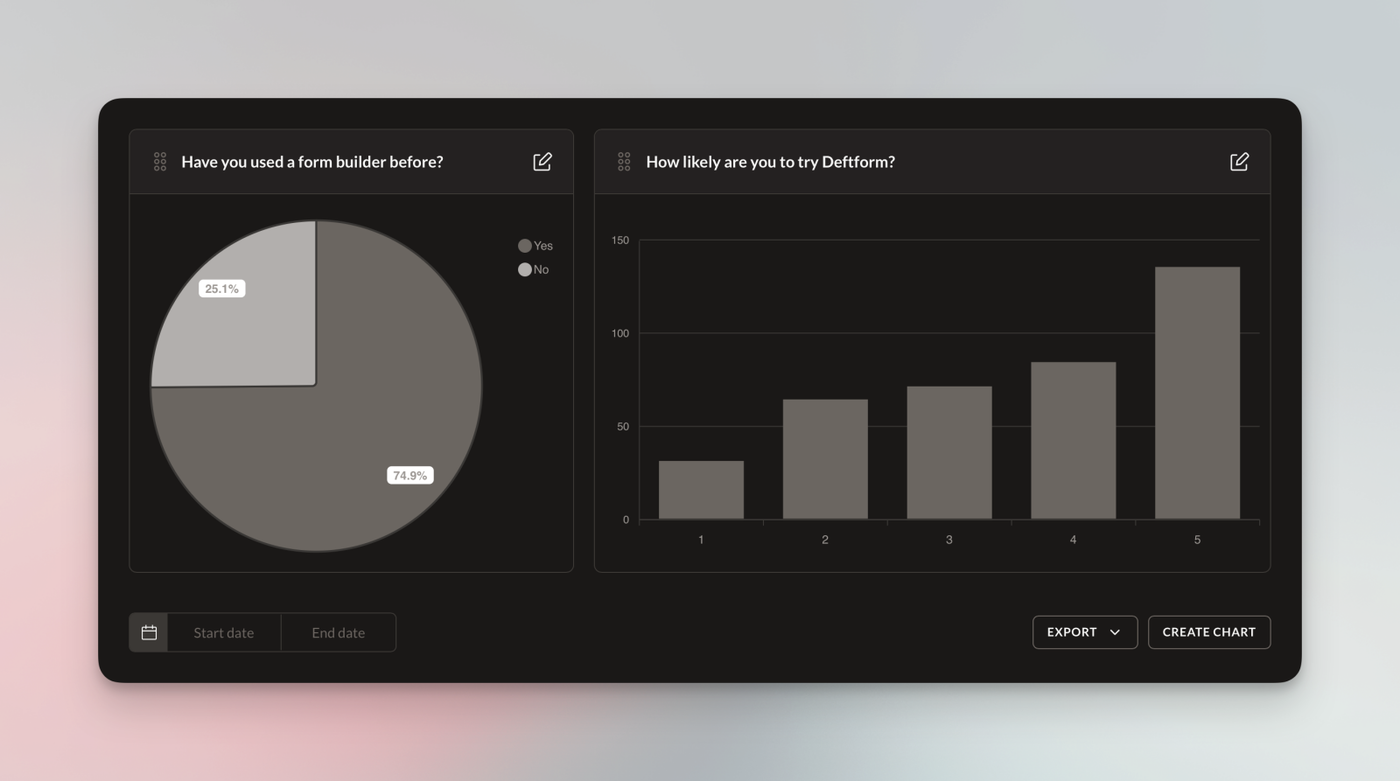
Today, we're happy to introduce version 1 of custom completions charts. We also shipped a few minor improvements and fixed some smaller bugs.

Custom charts

Version 1 of our custom completions charts is now available. To create a chart, go to the "Responses" view of a specific form. The "Create Chart" button is currently located next to the "Export" button.

You may create a chart with any of the currently supported field types "Single choice", "Multiple Choice", "Dropdown", "Country" and "Rating".

We may still change a few minor things in the next couple of days. If you have feedback, feel free to use our support widget (located in the lower left corner when logged in).

Multiple webhooks per form

It is now possible to attach multiple webhook endpoints to forms. Previously, only one endpoint could be added. It turns out that a few of our customers have a need for this, and we're happy to offer this now.

Changes, improvements, fixes

When adding a new page break to a form, it's now added at the bottom of the fields. Previously, it was added to the top, which slowed down form creation due to the need to scroll up and down frequently.

We also improved the loading time for the forms overview page. Statistics are now lazy-loaded, which improves page load significantly in many cases.

Apr 11, 2025

This one has been requested quite a few times and we're happy to finally release v1 of our multi-page functionality. You can now split long forms into multiple pages to make it easier for your users to go from page to page instead of being hit by a wall of fields to fill out.

We'd like to emphasize on the v1 here. There are plans to improve certain things and maybe change how pages are created in the form editor. We're looking forward to any kind of feedback from our customers. What do you like, what not, what could be better. Feel free to use the contact option in the lower left corner when logged-in.

Learn more about how to create pages.

Custom affiliate link

We added the option to add an affiliate link to our "Powered by Deftform" backlink. So instead of removing the backlink altogether, consider taking part in our affiliate program to earn 40% per sale.

Head over to the workspace settings and paste your affiliate link.

Additional fonts

3 new fonts were added that can be selected when creating or updating a custom style:

Maintenance updates and bug fixes

To conclude the update, we also updated the underlying software and systems to their latest versions and fixed a couple of bugs that were reported in the last few weeks.

We also silently removed the "Math" captcha a couple of days ago because it was causing errors under certain circumstances and since we were relying on a third-party solution, we were not able to provide a fix. For most people, the ALTCHA solution is the best and most privacy-friendly option and we recommend enabling this instead of Google reCAPTCHA.

For existing forms that had the math captcha enabled, we automatically migrated those to the ALTCHA captcha.

Dec 14, 2024

We just released early access to our API, added an option to enable a time picker, and fixed various, smaller bugs.

API in public beta

Our API is now available and should be considered public beta. Not all planned endpoints are available yet, and there is no official documentation yet. Nonetheless, feel free to head over to the new API settings to see how to get started.

Time picker option for date picker field

We added an option to enable a time picker if a form has a date picker field. This has been requested quite a few times, and we're happy to finally offer this option.

As noted in a recent update, you can change the locale of your workspace, which will change the language of the date picker, and it will now also take the time picker into effect. If you select "English US", you will have AM and PM in the 12h format; if you selected German, you will have 24h format. 

Fixes

We also fixed a handful of smaller issues and improved the field validations a little.

Dec 10, 2024

For those who need additional and extended features, we're happy to introduce our Business add-on.

This add-on allows you to enable data enrichment, which is best suited for B2B contacts. Only collect the email address and automatically gather additional data such as full name, social accounts, photo, phone numbers and various company details.

We also automatically check the validity of the email address that was entered by the user. So you can be sure that you received a valid email address.

Other features include a custom workspace logo in the backend, the ability to sell multiple products via Stripe, removal of the Deftform backlink, removal of the "Report form" badge, disabling of the 2-minute limit, and custom SMTP service integration (also available as a separate add-on).

The Business add-on is a monthly subscription and can be purchased via the Access / Billing section when logged in.